
Aphrodite Casino Sign Up, Log In & Start Playing
If you’re ready to jump into Aphrodite Casino, you’ll be happy to know that signing up and logging in only take a minute or two, and you can do everything right in your browser on any device.
What Is Aphrodite Casino?
Aphrodite Casino is our online hub where you get casino, live casino and full sportsbook action under one roof, all in a slick web platform. You’ll find popular slots like Cleopatra, Book of Dead and Rainbow Riches, plus live tables from providers such as 7Mojos Live, Vivo and Winfinity Live.
Big plus, we focus on fast registration and quick payments, with lightning‑speed deposits and withdrawals through familiar methods that you’ll see highlighted on the main page. The site also comes with 24/7 live human support and a dedicated FAQ and Help Centre section when you need a quick answer without chatting to support.
How to Create an Account at Aphrodite Casino
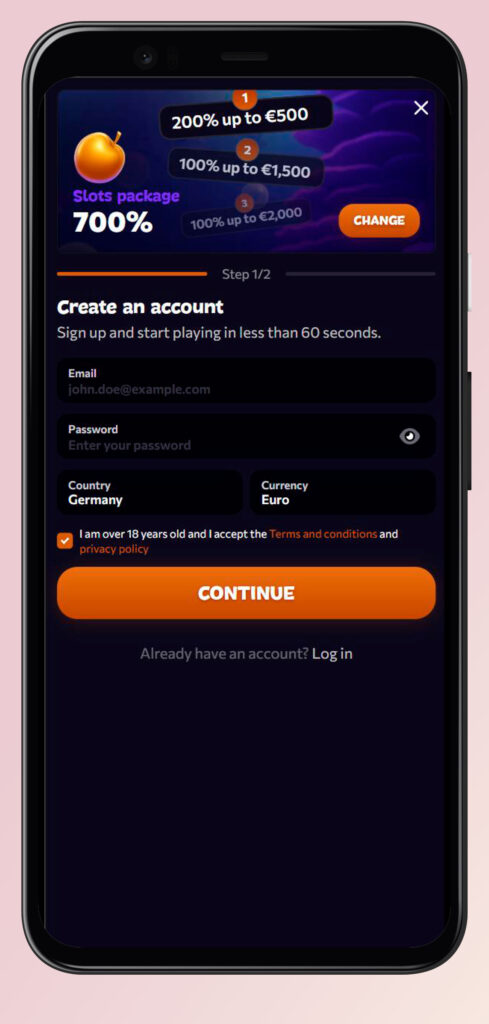
You’ll create your Aphrodite Casino account through a simple 2‑step registration flow that opens in a pop‑up when you hit “Sign up” on the main page or header. The whole thing is designed so you can go from first click to first spin in under 60 seconds if you have your details ready.
Choosing Your Welcome Bonus
Before you even type in your email, you can choose whether you want a welcome package or no bonus at all. The bonus picker appears as mobile‑friendly “packages” for Slots, Live Casino and Sports, each with several deposit steps that add up to a total value, for example, a Slots package that can reach up to €7,000 over multiple bonuses.
Typical bonus options you’ll see:
- Slots package with 5 deposit steps, such as 200% up to €500, then 100% up to €1,500 and more, reaching up to €7,000 in total bonus value.
- Live Casino package focused on table games with several match bonuses tailored to live roulette and blackjack fans.
- The sports package is built around free bets and match offers for your first deposits into the sportsbook wallet.
- “No bonus” option if you prefer playing with pure cash and no wagering requirements at all.
If you change your mind, you can reopen the package selector from the registration window and flip between Slots, Live and Sports or choose to continue without any bonus attached.
Step 1 — Basic Details (Email, Password, Country, Currency)
First, you fill in the core login and Aphrodite Casino account settings so we can create a secure profile for you. On Step 1, you’ll see fields for email, password and a combined country and currency selector powered by an international phone and country picker.
Here’s what you’ll enter in Step 1:
- Email address: Your main login and where Aphrodite Casino sends verification and password recovery links (format like john.doe@example.com is shown as an example in the form).
- Password: A private password that you can toggle visible while typing, with strength hints handled on the backend side and a dedicated password field.
- Country: A dropdown with the full list of supported countries, including EU countries, the UK and many international options like Zambia, Venezuela, Western Sahara and more.
- Currency: This auto‑suggests based on your selected country and available brand currencies such as EUR, AUD and CAD, with Euro set as the default base currency.
If your country has its own local currency in the brand’s list, the form will try to pick it; if not, it falls back to Euro or another global option, so you always have a working wallet currency. Once you hit “Next”, the wizard jumps to Step 2 without reloading the page.
Step 2 — Personal Info (First Name, Last Name, Phone, Date of Birth)
Now you add the personal details and paa Aphrodite Casino verification to keep payments smooth. The Step 2 screen appears in the same modal and focuses on identification and contact info.
You’ll be asked for:
- First and last name exactly as on your ID documents, so KYC checks and withdrawals go through without drama.
- Full address details, including country, city, street and postal code, with placeholders that adapt to the selected country (for example, “10178” as a ZIP format sample for some regions).
- Mobile phone number with an international dial code selector driven by an “intl‑tel‑input” widget so you can pick your correct country code and format.
- Date of birth via day/month/year dropdowns, with the year list limited so only 18+ players can register at Aphrodite Casino.
Once everything looks good, you tap “Register”, and your Aphrodite Casino account is created instantly, with the option to go back to Step 1 if you want to tweak your email or country before final submission.
| Step | Screen | Key fields | Bonus selection |
| 1 | Basics | Email, password, country, currency | Package picker at the top |
| 2 | Personal details | Name, address, phone, date of birth | Can still change the package |
| 3 | After submit | Aphrodite Casino’s account was created, prompting to deposit or play the demo | Bonus applied if selected |
How to Log In on Desktop
Once you’ve created your Aphrodite Casino account, logging in on desktop is super straightforward. The “Log in” button sits in the top‑right corner of the header and also appears in the main hero block as “Log in and let the games begin”.
To log in to Aphrodite Casino on desktop:
- Click the “Log in” button in the Aphrodite Casino header or main block and wait for the authentication modal to appear.
- Enter your registered email address and password into the two‑field form labelled “Email” and “Password”.
- Hit the big “Log in” button, and you’ll be dropped straight into the lobby, casino, live casino or sports depending on where you were browsing.
- If you don’t have an Aphrodite Casino account yet, a link under the form says “Don’t have an account yet? Sign up”, which opens the same 2‑step registration wizard.
Bottom line, you don’t have to leave the page you’re on, since the login modal overlays the content and closes as soon as the login succeeds.
Mobile App Login via Browser
Now, if you prefer playing on your phone, you’ll use the same login flow in your mobile browser, so there’s no separate app to worry about. The site is fully responsive with mobile‑optimised registration and login modals.
On mobile, you:
- Tap the burger menu or the “Log in” button visible in the header, depending on your screen size.
- Get the same email and password fields, plus eye icons to show or hide the password as you type.
- Stay logged in across sessions unless you manually log out, with the site detecting mobile layout and giving you touch‑friendly buttons and game cards.
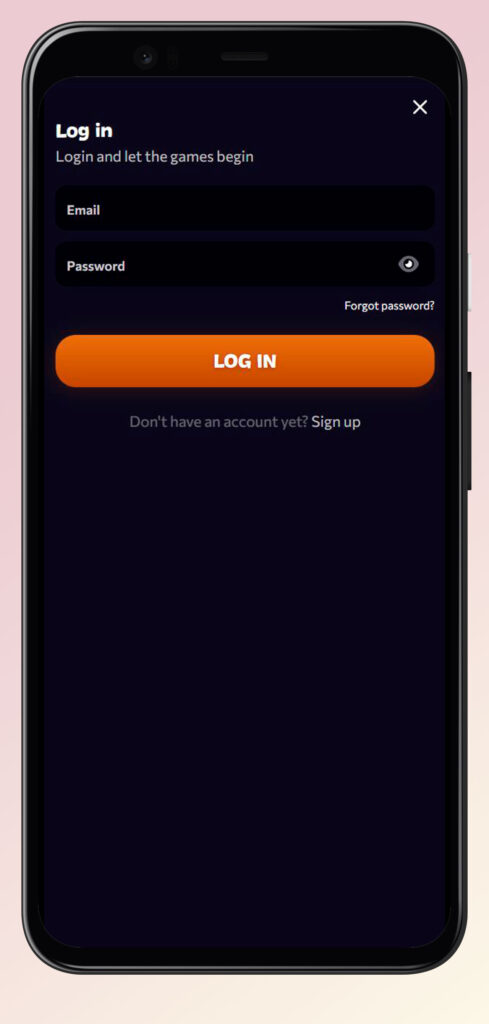
Big plus, the welcome package selector has a dedicated mobile layout called “hero‑packages‑mobile”, so choosing your bonus on the go is just as easy as on desktop.
Account Security & Recovery
We know you care about keeping your account safe, so Aphrodite Casino wraps all this in modern encryption and secure login components. On top of that, the Help Centre FAQ directly mentions that we protect your personal and financial data according to strict privacy and security standards.
You’ll notice:
- Encrypted forms for login, registration and payments running on HTTPS throughout the site.
- Clear “Forgot password?” flows inside every login modal so you can quickly recover access without talking to support.
- Age‑restricted date of birth fields to keep minors out and comply with licensing requirements.
If you still feel something’s off with your account, the Support and FAQ buttons in the sidebar let you jump straight to live support or detailed help articles.
Password Management
Honestly, the easiest way to stay safe is to treat your Aphrodite Casino password like the keys to your car, unique and not shared with anyone. The Aphrodite Casino login and signup forms give you a dedicated password field with the option to reveal or hide what you type so you can avoid typos before you submit.
Tips for managing your password here:
- Use a strong mix of letters, numbers and symbols to reduce the chance of someone guessing it.
- Avoid reusing the same password from other sites, especially email or banking services.
- Update your password if you ever suspect someone else has seen or used your login.
You control the visibility toggle through the eye icon directly in the password box, which flips between hidden and visible states without reloading the page.
Forgot Password — How to Recover Access
If you forget your password, you don’t need to panic or open a ticket right away. Every login modal has a “Forgot password?” link that opens a separate recovery window titled “Recover your password”.
Here’s how the recovery works:
- Click or tap “Forgot password?” under the login form to open the password recovery modal.
- Enter the email address linked to your Aphrodite Casino account in the single input field labelled “Email”.
- Hit “Send Link” and we’ll email you a password reset link so you can create a new password and get back to playing.
If the email does not arrive within a few minutes, check your spam folder or use the “Support” button in the sidebar to contact our team for extra help.
Supported Languages & Currencies
Let’s talk comfort: you can change the site language and deposit in different currencies, which is especially handy if you travel a lot or just prefer playing in your native language. The language selector lives in the sidebar and footer area as a dropdown built with the Choices component.
Languages you can select include:
- English, German, Swedish, Norwegian, Spanish and French for a good European spread.
- Italian, Polish, Dutch, Finnish, Danish and Portuguese for even more localisation.
- Greek and a few extra options depending on where you access the site from.
On the currency side, the brand’s default is Euro, set with code EUR and symbol €. You can also see support for other currencies like the Australian Dollar (AUD) and the Canadian Dollar (CAD), which are offered when your selected country and brand configuration allow them.
| Feature | Options available |
| Site languages | EN, DE, SV, NO, ES, FR, IT, PL, NL, FI, DA, PT, EL and more via language selector |
| Base currency | Euro (EUR, €) is the default; the selected country may offer extra options like AUD or CAD |
| Country link | Country choice controls phone format, address placeholders and default currency suggestions |

FAQ
You click the “Sign up” button, pick your welcome package if you want one, then complete the 2‑step registration with your email, password, country, currency and personal details; the Aphrodite Casino account is created as soon as you hit “Register”.
Yes, you tap or click “Log in” in the header, enter your email and password in the small modal, and press “Log in” to jump back into the games without leaving your current page.
Use the “Forgot password?” link under the login form, enter your email in the “Recover your password” window, and we’ll send you a reset link straight to your inbox.
You can switch between several languages like English, German, Swedish, Norwegian, Spanish, French, Italian, Polish, Dutch, Finnish, Danish, Portuguese and Greek using the language dropdown.
Euro is the main default currency, with additional options such as AUD and CAD appearing for certain countries; the registration form automatically suggests the best available currency based on where you live.
Yes, the Help Centre confirms that we use advanced security measures like encryption and strict privacy policies to keep your personal and financial data protected at all times.
Aphrodite Casino verification is a standard KYC process where we may ask you to upload ID, address proof and sometimes payment method documents so we can confirm your identity and keep withdrawals and gameplay compliant with our licence and security rules.